
TiVo Home Screen
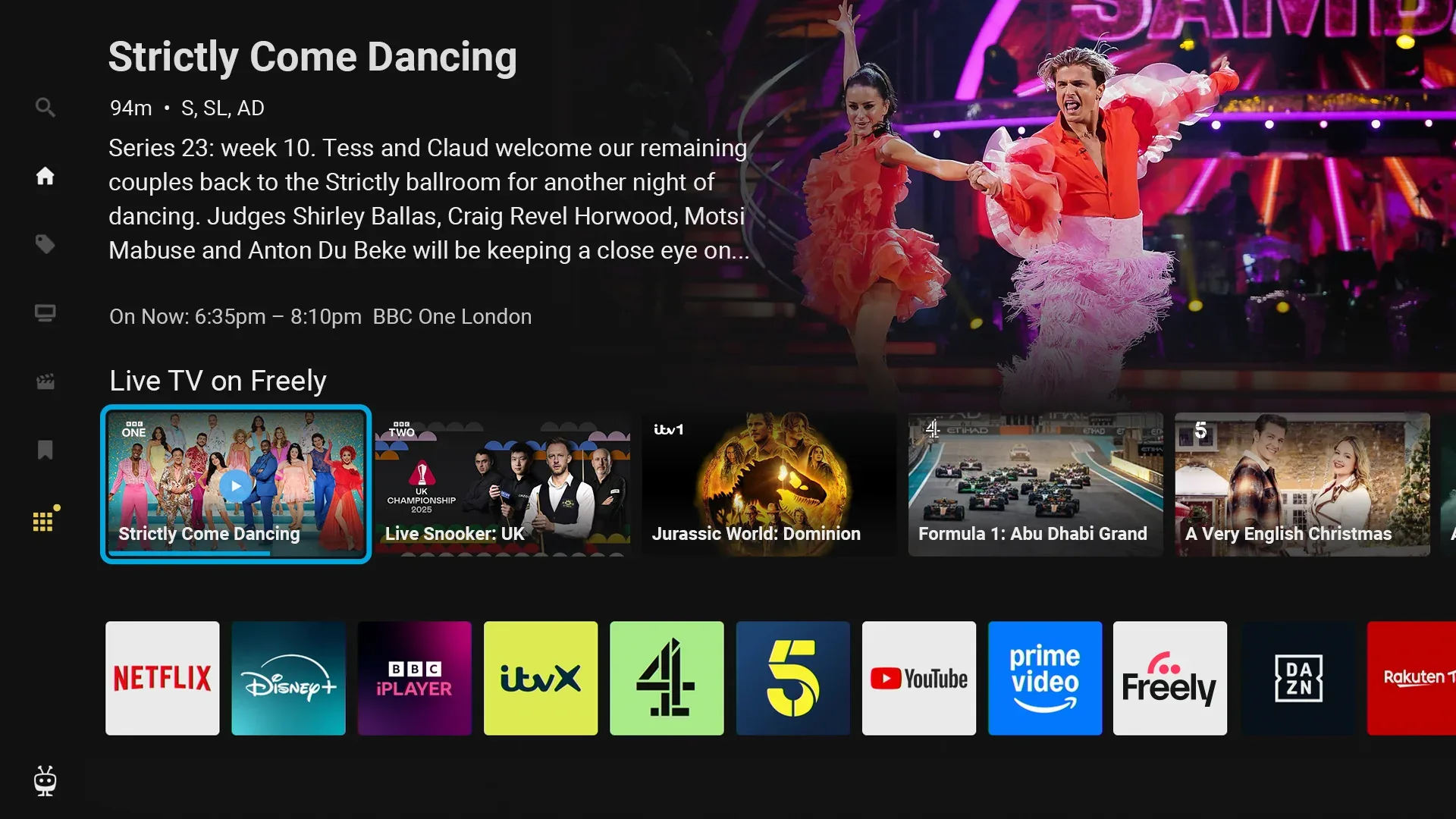
The TiVo Home screen is your hub for streaming apps, personalised recommendations, and quick access to all your Aero’s features. Press the TiVo button on your remote to open it at any time.
Navigating the Home Screen
The Home screen is organised into rows of content. Use your remote to browse:
- Up/Down: Move between rows
- Left/Right: Scroll through items within a row
You’ll find rows for Live TV channels, personalised recommendations based on your viewing, and My Apps, where your favourite streaming apps live.
You’ll also find a Sports carousel bringing together live, upcoming and on-demand sport.
Tip: You can also jump straight to a live channel by entering its number on the remote, even from the Home screen. Your Aero will tune to that channel after a brief moment.
The Sidebar Menu
Press left from the Home screen to open the sidebar menu. Here you’ll find:
- Search: Find films and series across streaming apps like Netflix, Prime Video, and Disney+
- Watchlist: View programmes you’ve saved to watch later
- TiVo Channels: Browse handpicked free live and on-demand content from TiVo Channels, Plex, Tubi, Pluto TV, Rakuten TV and other services. Some selections open the provider’s app
- All Apps: Browse and open any app installed on your Aero
- Settings: Adjust your Aero’s settings, including display, sound, and accessibility
Search doesn’t currently cover Freely – use the Search tab in Freely. Bringing Freely content into search is a high priority for Freely and TiVo, though there’s no date yet.
My Apps
The My Apps row gives you quick access to your most-used streaming apps. You can customise this row to put your favourites front and centre.
To add an app, head to All Apps in the sidebar, find the app you want, and follow the on-screen options to add it to My Apps.
To move an app, highlight it in My Apps and press and hold OK. When arrows appear either side of it, move it with Left/Right, then press OK to confirm.
Personalising Your Experience
The Home screen learns from your viewing habits and improves its recommendations over time. You can help it get to know your tastes:
Rate content: When you see something you like (or don’t), use the Thumbs Up or Thumbs Down buttons on your remote. This helps TiVo understand what to recommend.
Use your Watchlist: When you spot something you’d like to watch later, add it to your Watchlist. You can access your saved items anytime from the sidebar menu. Note that this Watchlist is separate from Freely’s My List – items you save in one won’t appear in the other. They cover different content: the Watchlist is for content found on the TiVo Home screen, and My List is for programmes in the Freely guide.
The more you interact with the Home screen, the better it becomes at surfacing content you’ll enjoy.
TiVo Channels Live Carousel
The Home screen includes a TiVo Channels live carousel for quick access to channels currently playing in the TiVo Channels app. You’ll see it as a row on the Home screen alongside your apps and recommendations. See TiVo Channels for more about TiVo Channels and its TV Guide.
Navigation Sounds
Aero plays a subtle audio cue as you move around the menus. To change the level, or turn the sounds off:
Settings → System → System Sounds
Options are Off, Low, Medium, and High. The default is Low.