
Remote Control Buttons
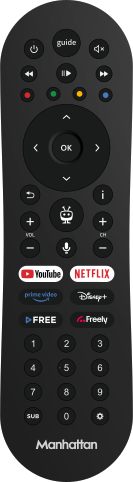
Learn what each button on your Aero remote does.
Guide to the Aero Remote's Buttons
Learn what each button on your Aero remote does.
| Button | Description |
|---|---|
| Put Aero into standby, or wake it over Bluetooth without line of sight (software 20.1182.97 or later) | |
| Open the TV Guide | |
| Mute volume. Hold for Accessibility Shortcuts | |
| Rewind | |
| Play/Pause | |
| Fast Forward | |
| Colour Buttons: Perform the on-screen function | |
| Navigate through menus and confirm selection | |
| Go back one step in menus. Hold for about two seconds to exit – from an app to the Home screen, or from a Freely menu to live TV | |
| Show more information about a highlighted programme | |
| Turn volume up/down | |
| Open the TiVo Home Screen | |
| Change channel when watching TV | |
| Press and hold to use voice commands | |
| Open YouTube | |
| Open Netflix | |
| Open Prime Video | |
| Open Disney+ | |
| Open TiVo Channels | |
| Open Freely | |
| … | Enter a channel number (works from the TiVo Home Screen) |
| Toggle subtitles on live Freely channels (see note below) | |
| Open the Settings menu |